- Aug 08 Wed 2018 12:11
-
WINDOWS 10 安裝 IIS
- Jun 27 Wed 2018 16:43
-
Fortinet Fortigate 新版本 5.0 5.2 5.4 5.6 需要使用 custom NTP server CLI
- Jun 22 Fri 2018 12:30
-
opensuse 15 sshd 服務
首先停止 opensuse內建的防火牆
# /etc/init.d/SuSEfirewall2_init stop
# /etc/init.d/SuSEfirewall2_setup stop
# chkconfig SuSEfirewall2_init off
# chkconfig SuSEfirewall2_setup off
# /etc/init.d/SuSEfirewall2_init stop
# /etc/init.d/SuSEfirewall2_setup stop
# chkconfig SuSEfirewall2_init off
# chkconfig SuSEfirewall2_setup off
- Jun 22 Fri 2018 12:22
-
OpenSSH Server 設定
OpenSSH Server 設定
環境本身已經預載了 OpenSSH Server,我們只需進行一些設定便可從外部 SSH 連線進去。
首先,先使用 ssh-keygen 產生 key,接著打開 sshd_config 來編輯設定:
$ sudo /usr/bin/ssh-keygen -A
$ sudo vim /etc/ssh/sshd_config
主要有兩個設定需要修改,分別是監聽的連接埠以及允許使用密碼認證的選項。
環境本身已經預載了 OpenSSH Server,我們只需進行一些設定便可從外部 SSH 連線進去。
首先,先使用 ssh-keygen 產生 key,接著打開 sshd_config 來編輯設定:
$ sudo /usr/bin/ssh-keygen -A
$ sudo vim /etc/ssh/sshd_config
主要有兩個設定需要修改,分別是監聽的連接埠以及允許使用密碼認證的選項。
- Jun 21 Thu 2018 15:22
-
opensuse 15 network YaST2
有二種方式
第一種 YaST 2控制中心左邊的軟體項目當中選擇軟體管理模組= => 選擇 網路設定.
第一種 YaST 2控制中心左邊的軟體項目當中選擇軟體管理模組= => 選擇 網路設定.
- May 22 Tue 2018 08:47
-
VMWARE VSPHERE ESXI 忘記密碼
- May 22 Tue 2018 08:14
-
主機加了 記憶體 卻沒有用 Max Pool Size 預設值為 100
- May 22 Tue 2018 08:04
-
如何在 Mac OS 中連線至 NAS 網路磁碟
在 Mac Finder 上,點選 [Go] > [Connect to Server]
使用以下其中一種方法掛載NAS的磁碟:
AFP: 輸入 NAS IP 或 afp://NAS_IP
使用以下其中一種方法掛載NAS的磁碟:
AFP: 輸入 NAS IP 或 afp://NAS_IP
- Apr 02 Mon 2018 11:51
-
linux 上的 postfix ispconfig vmail 郵件更改名稱
- Mar 02 Fri 2018 09:14
-
chrome 減少記憶體佔用
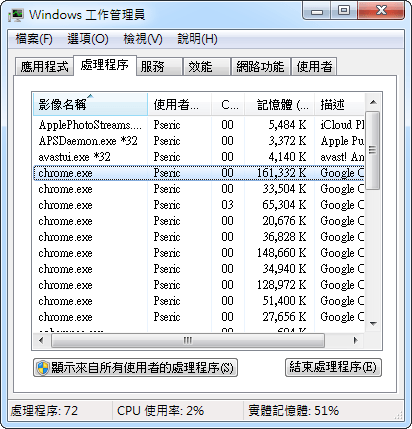
1.減少網站的處理程序,減少記憶體佔用
在預設情況下,Google Chrome 瀏覽器會開啟許多的處理程序
如果開啟 Windows 工作管理員來檢視一下
可以發現 chrome.exe 可能就會有很多個。
- Feb 13 Tue 2018 15:57
-
win7 win10 電腦網卡 reset 指令
- Feb 13 Tue 2018 13:56
-
SQL SERVER EXPRESS 2012 2008R2 免費 測試版本的 資料庫
微軟的說明文件,SQL SERVER EXPRESS 2012 2008R2 並沒有放寬記憶體使用1G的限制
使用了TSQL語法查看記憶體使用量,與使用工作管理員查看.均是使用了2G,不解是文件錯誤,還是實際上有放寬!
使用的查詢語法如下
--查看SQL版本
SELECT SERVERPROPERTY('Edition') , SERVERPROPERTY('ProductVersion')
--查看SQL SERVER記憶體使用量
select cntr_value/1024 from master.dbo.sysperfinfo
where counter_name = 'Total Server Memory (KB)'
使用了TSQL語法查看記憶體使用量,與使用工作管理員查看.均是使用了2G,不解是文件錯誤,還是實際上有放寬!
使用的查詢語法如下
--查看SQL版本
SELECT SERVERPROPERTY('Edition') , SERVERPROPERTY('ProductVersion')
--查看SQL SERVER記憶體使用量
select cntr_value/1024 from master.dbo.sysperfinfo
where counter_name = 'Total Server Memory (KB)'